Realtime tracker by detections wrote in javascript for node.js / browsers
node-moving-things-tracker is a javascript implementation of the "tracker by detections" for realtime multiple object tracking (MOT).
It takes in input a txt file (TODO change to json) generated by node-yolo and outputs a tracker.json file that assigns unique IDs to the YOLO detections bbox.
_The detections entry file could be generated by object detection algorithm than YOLO, it just needs to respects the same format.
Detections input:

Tracker output:

Requires node.js , available as a npm module: http://npmjs.com/node-moving-things-tracker
# Install globaly to use as command line tool
npm install -g node-moving-things-tracker

# Install localy your node.js / javascript project
npm install --save node-moving-things-tracker
Command line usage
NOTE : usage is customized for the use case of lab-beat-the-traffic
node-moving-things-tracker --input PATH_TO_YOLO_DETECTIONS.txt
# This will output a tracker.json file in the same folder containing the tracker data
As an external module
See usage in lab-traffic-cam
const Tracker = require('node-moving-things-tracker').Tracker;

Tracker.updateTrackedItemsWithNewFrame(detectionScaledOfThisFrame, currentFrame);

const trackerDataForThisFrame = Tracker.getJSONOfTrackedItems();See example here:
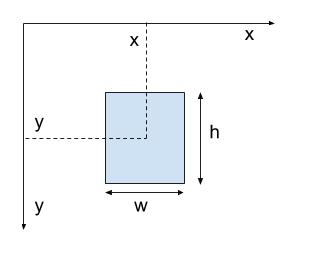
Coordinate space:
Detections Input
rawdetections.txt
{"frame":0,"detections":[{"x":699,"y":99,"w":32,"h":19,"prob":34,"name":"car"},{"x":285,"y":170,"w":40,"h":32,"prob":26,"name":"car"},{"x":259,"y":178,"w":75,"h":46,"prob":42,"name":"car"},{"x":39,"y":222,"w":91,"h":52,"prob":61,"name":"car"},{"x":148,"y":199,"w":123,"h":55,"prob":53,"name":"car"}]}
{"frame":1,"detections":[{"x":699,"y":99,"w":32,"h":19,"prob":31,"name":"car"},{"x":694,"y":116,"w":34,"h":23,"prob":25,"name":"car"},{"x":285,"y":170,"w":40,"h":32,"prob":27,"name":"car"},{"x":259,"y":178,"w":75,"h":46,"prob":42,"name":"car"},{"x":39,"y":222,"w":91,"h":52,"prob":61,"name":"car"},{"x":148,"y":199,"w":123,"h":55,"prob":52,"name":"car"}]}
Tracker Output
Normal mode:
{
  // Tracker data for each frame
  "43": [
    {
      "id": 0,
      "x": 628,
      "y": 144,
      "w": 48,
      "h": 29,
      "name": "car",
    },
    {
      "id": 1,
      "x": 620,
      "y": 154,
      "w": 50,
      "h": 35,
      "name": "car",
    }
  ]
}
Debug mode:
#Run with ---debug flag at the end
node-moving-things-tracker --debug --input PATH_TO_YOLO_DETECTIONS.txt
{
// Tracker data for each frame
"43": [
{
"id": "900e36a2-cbc7-427c-83a9-819d072391f0",
"idDisplay": 0,
"x": 628,
"y": 144,
"w": 48,
"h": 29,
"name": "car",
"isZombie": false,
"zombieOpacity": 1,
"appearFrame": 35,
"disappearFrame": null
},
{
"id": "38939c38-c977-40a9-ad6a-3bb916c37fa1",
"idDisplay": 1,
"x": 620,
"y": 154,
"w": 50,
"h": 35,
"name": "car",
"isZombie": false,
"zombieOpacity": 1,
"appearFrame": 43,
"disappearFrame": null
}
]
}No params tweaking is possible via command-line for now, it is currently optimized for car tracking.