
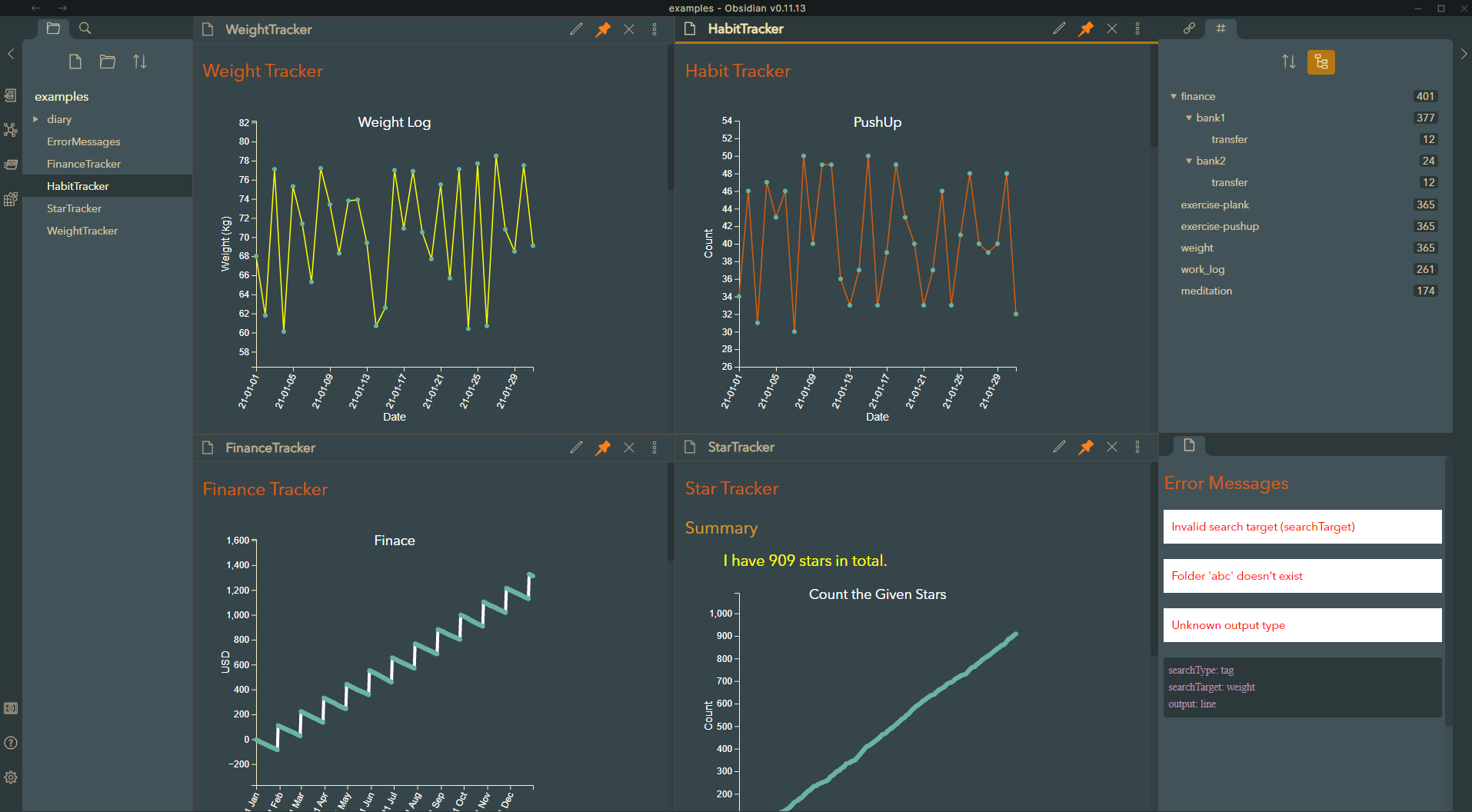
This is an Obsidian plugin that helps you do tracking in daily notes. You can track:
- the number of occurrences of in-line tags (e.g. #meditation)
- the number of occurrences of front matter tags (e.g. tags: meditation)
- the values after tags (e.g. #weight:60.5kg)
- the values after a nested inline tags (e.g. #finance/bank1/transfer:100000USD and the parent tag #finance/bank1)
- the values of a key in the front matter (e.g. mood: 10)
- the number of occurrences of wiki links (e.g. [[journal]])
- the number of occurrences of texts (e.g. '⭐', 'love', or any text that matches your regex expression)
- the values embedded in texts using regular expression (e.g. walk 1000 steps, weightlifting: 50)
- From Settings Panel (the icon at the bottom left corner) -> Options -> Community plugins, set 'safe mode' to off.
- In the 'Community plugins' section, click 'Browse' and find the obsidian-tracker plugin by the name 'Tracker'.
- Press the button 'Install' and wait for the completion of the install.
- In the section 'Installed plugins', find and enable the plugin just installed.
- Enjoy tracking.
Download the latest release. Extract and put the three files (main.js, manifest.json, styles.css) to folder '{{obsidian_vault}}/.obsidian/plugins/obsidian-tracker'.
-
Have some targets you want to track in daily notes. Take a look at Target Evaluation for what you can track and how targets are evaluated as numbers.
-
Add a new note for displaying the tracker.
-
Add tracker code blocks manually or using commands. See Commands for more detail.
-
Switch the document view mode to 'Preview', then the code block will get rendered.
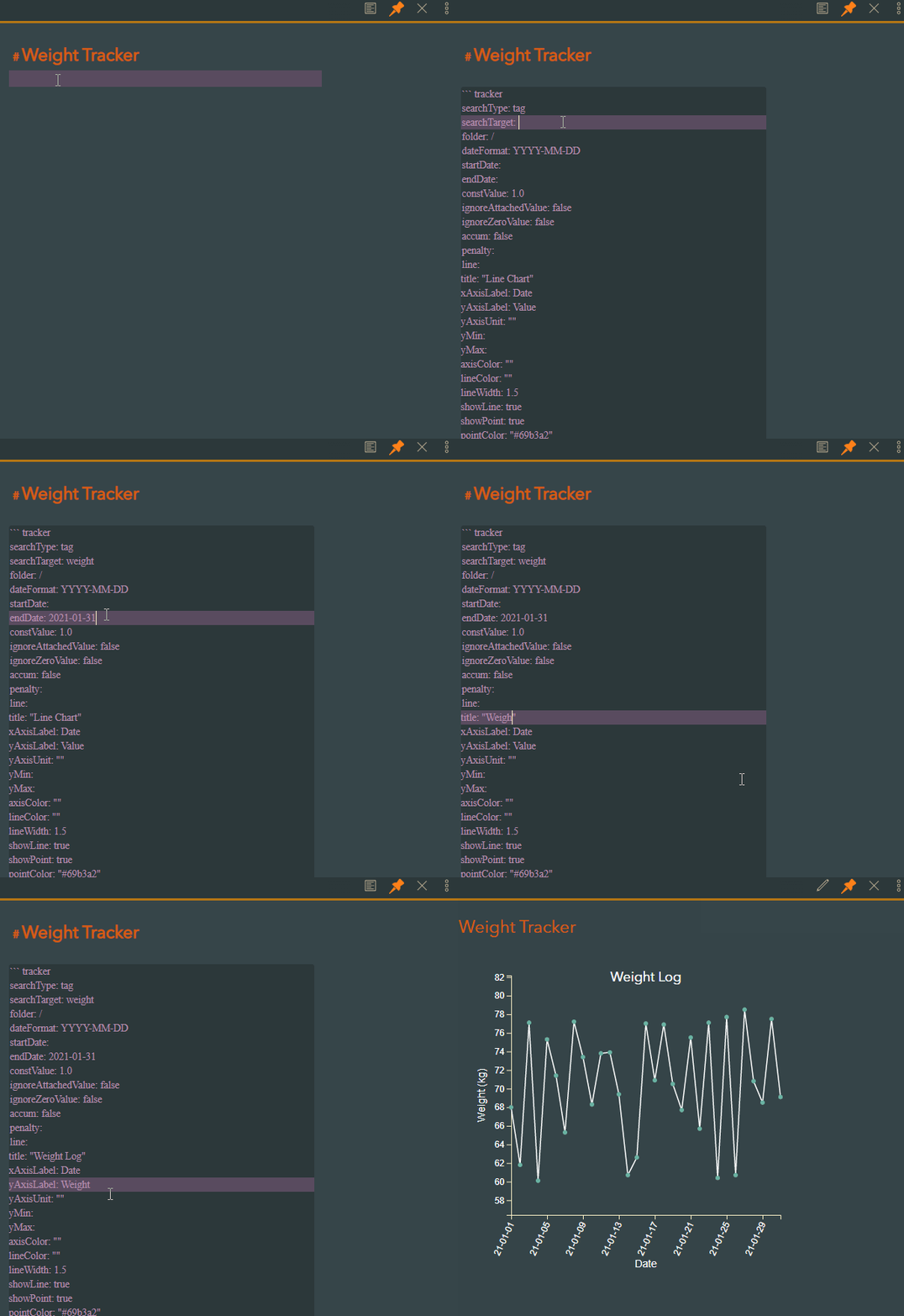
For more use cases, please take a look at examples.
This plugin was designed to read code blocks in YAML format. The key-value pairs in the code blocks tell the plugin what data to collect and how to render the result.
Here are all the parameters (key-value pairs) defined in this plugin. They are used for collecting data, evaluating targets, data preprocessing, and rendering output.
Providing key 'searchType' and 'searchTarget' is the minimum requirement for a successful data collection and rendering. The value of key 'searchType' can be 'tag', 'frontmatter', 'wiki', or 'text', and the cooresponding 'searchTarget' is the name of a tag or a piece of text as your search target.
Depends on the searchType and the format of your targets, the target evaluation would be different. You can simply track the occurrences of a target or track value attached/embedded in it.
For more information about the tag evaluation, please check documents for Target Evaluation
Currently, obsidian-tracker provides two kinds of rendering output, the default one 'line' for line chart and 'summary' for a text description.
For 'line' output, the plugin will generate a customizable line chart. For 'summary' output, you can use pre-defined template variables in text template (key 'template' under key 'summary').
Description of keys for rendering line-chart and summary output can be found here
You can set the default folder location and date format in the plugin's settings panel. You can also override them by key 'folder' and 'dateFormat' in the code block respectively.
| Setting Item | Default | Description |
|---|---|---|
| Default folder location | Root of the vault | The folder your daily notes reside |
| Default date format | YYYY-MM-DD | The date format of your daily note title |
For more information about the dateFormat settings, check the TestDateFormats example and moment.js string format.
- Fix files with the specified dateFormat are not recognized.
- Restore plugin's settings panel for dateFormat and folder.
- Enable using regular expression in text searching.
- New search type 'frontmatter', searching for key-value pairs in the front matter.
- New search type 'wiki', searching for wiki links.
- Reduce package size.
- New output type 'summary'.
- Add commands help create Tracker code blocks.
- Relax the regex for searching tags, allow tags embedded in sentences.
- Fix issues.
- Fix the searching of nested tag in frontmatter.
- Reduce the package size by using the module from Obsidian.
- Remove dependencies to Node.js modules.
- Add example markdown files.
First version released at 2021-03-23.
- Track simple tags, value-attached tags, and texts using code blocks.
- Represent the tracked data in a customizable line chart.
- Allow tracking in-line tags and tags in frontmatter.
- Allow tracking nested tags.
- New output type 'summary', analyzes the input data and represents it using a user-defined text template.
- Add Commands help create Tracker blocks.
- New output type 'table', lists the search result in a formatted table.
- New output type 'heatmap', works like Github calendar heatmap.
- New output type 'bar', renders bar chart.
- Support multiple targets and multiple values.
- Support searching text using regular expression.
- Support tracking key-value pairs in frontmatter.
- Add data post-process function, like 'moving average'.
- Add an 'Explode' button to the rendered blocks, it will replace the code block with the rendered result.
- Support graphs showing the correlation between sets of data.
- Add a helper panel for adding frequently used tracking targets to article.
- Add a dateTarget key for tracking notes not named in the date format.
- Add a 'targetDataSet' key to graph, allow the graph drawing selected dataset.
- Allow tracking datetime value.
And more ...
P.S. Items may not be implemented in the order above.
- If you like this plugin or want to support further development, you can Buy Me a Coffee.
- Please report bugs and request features in GitHub Issues